
FluidPrompter & PresenterTek present

The right height for the right speaker at the right moment

FluidPrompter integrates with PresenterTek's presidential rise-and-fall teleprompters to give you a quicker, smoother way to adjust the stand's height, from one speaker to the next.

Thom Tanner

Thom Tanner

Co-Founder & Mechanical Engineer, PresenterTek

Integrating a teleprompter app with our robotic rise-and-fall stands has always been the holy grail for operators. Several prompter apps have tried and failed. Then, along came FluidPrompter. Now, together, we can finally offer this capability to our customers.

Your speaker, your script, and your stand - finally on the same page

When you integrate PresenterTek's TeleStepper® with FluidPrompter, you get a simpler setup with more control.

Up to 24 height positions available

Make micro height adjustments on the fly, right from the app. Or define up to 6 memory positions ahead of time so the right height presets are ready to go. Either way, you're no longer limited by the number of programmable buttons on your controller or keypad.

Adjust the stand directly from the app

You can always adjust the height of your rise-and-fall teleprompter directly from FluidPrompter's interface.

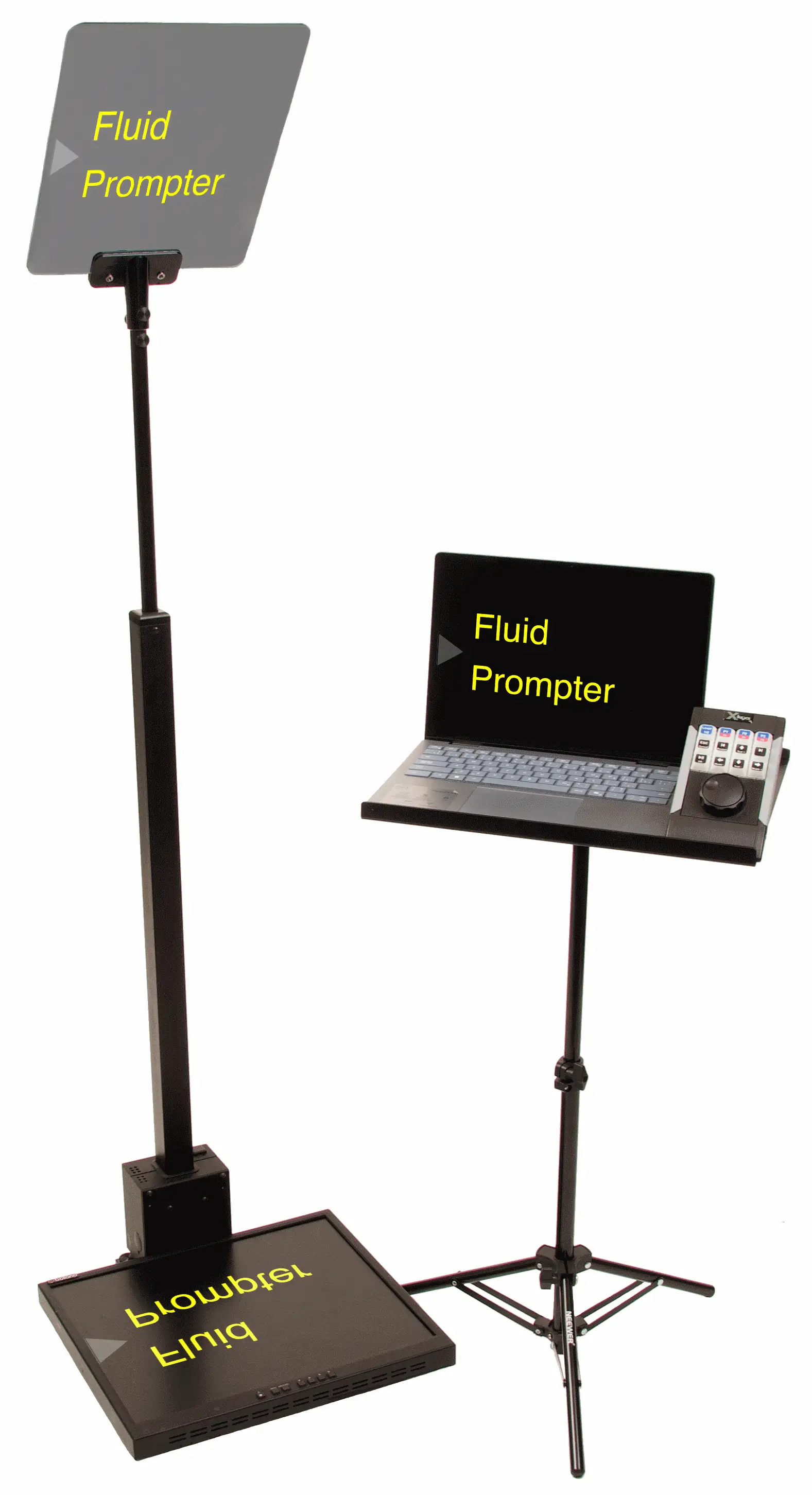
Integrate your X-keys Jog and Shuttle

FluidPrompter integrates with the X-keys Jog and Shuttle. Ideal for operators who prefer using a programmable controller with custom backlit keys in dark backstage environments.

Feed your prompters from 300 ft away

Long distances between your operator and the stage? No problem. Use our SDI output and your SDI cables for a dedicated video feed to your presidential prompters. No converter box needed.

PresenterTek presidential teleprompter beside a laptop stand with an X-keys controller
Steve McNerney

Steve McNerney

President & Electrical Engineer, PresenterTek

For live events, you have to reduce the chance of error as much as possible. Having an integrated control that's simple, intuitive, and reliable is critical. FluidPrompter understands that, and it shows in how they've developed their app.

The back story

A match made in heaven for any stage on earth

(Half-joking! We engineers aren't the sappy kind. We just like stuff that works.)

From wishful thinking to stage reality

Presenters and their teleprompters must see eye to eye

Every live-event teleprompter operator knows the moment:

One speaker finishes. Applause breaks. The next speaker walks toward the podium - two heads taller than the last.

Do you have a teleprompter that rises (or falls) to the occasion? One that doesn't let you down when it matters most?

In 2016, PresenterTek reshaped the industry with the TeleStepper® - a reliable, remotely operated, "barely there" rise-and-fall teleprompter trusted on stages like the White House, Pentagon, United Nations, Apple, and major corporate keynotes.

What if your teleprompter script could move your teleprompter stand, not just your speaker's lips?

True engineers always see more innovation on the horizon. PresenterTek's founders, Steve McNerney and Thom Tanner, knew operators wanted even greater control: more flexibility, more height presets, more ways to adjust the stand from wherever they were working.

What if operators could adjust the height directly from the teleprompter software itself? It seemed like the next obvious evolution.

But there was a problem.

Few teleprompter software companies stepped up to the plate. And of those that did, none were able to make it happen. Except for FluidPrompter.

Your speaker, your script, and your stand - simply in sync

PresenterTek's hardware is known for its precision, reliability, and craftsmanship - the kind you need on stages with high stakes and no room for error.

At FluidPrompter we share that same ethos on the software side. So at the 2025 NAB Show, our founders Ben and Stan approached Steve and Thom at their PresenterTek booth.

Let's just say, there was no small talk. We all saw the opportunity to begin collaborating. And the rest, as they say, is history.

The FluidPrompter difference

Robust code that knows how to talk to your robust hardware

FluidPrompter's integration was built to feel dependable under live-event pressure: direct stand control, predictable behavior, and software that respects the realities of working hardware on a real stage.

Steve McNerney

Steve McNerney

President & Electrical Engineer, PresenterTek

OEM protocol is a more reliable way for software to talk to our stands. It uses multiple ways to check and confirm that the right message is being sent. Ben and Stan are very skilled, experienced developers, which is why they've been able to program our integration using the better, more advanced method.

Why FluidPrompter & PresenterTek?

Shared values lead to better solutions

Here's why PresenterTek and FluidPrompter are a natural fit on stage and behind the scenes.

True craftsmanship means no corners cut

Whether it's your hardware onstage or the software behind the scenes, both PresenterTek and FluidPrompter believe in building things you can count on when it matters most. No "cheap" shortcuts here.

Made for the way operators think and work

Simplicity is essential to success on the stage. We design tools that keep operators focused on the show, not on navigating complex menus or juggling multiple devices. When everything behaves as expected, operators do their best work.

Support from real humans you can rely on

PresenterTek and FluidPrompter both believe in top-notch support - the kind where you talk to the people who actually built the product. You get helpful, meaningful responses from experts who understand your setup.

Thom Tanner

Thom Tanner

Co-Founder & Mechanical Engineer, PresenterTek

One thing we've learned is that if you have good customer service, people remember it. They come back to you. And FluidPrompter shares that same commitment - they really listen, they follow up, and they take care of their customers.
How it works

Unlock our PresenterTek integration on the Studio Team plan

01

Download our desktop app

You will need FluidPrompter desktop app. It is available for Windows, Mac, and Linux, and it gives the integration direct access to the local hardware connection your PresenterTek setup uses.

You will also need to upgrade to our Studio Team plan if you have not already.

02

Connect your PresenterTek teleprompter

FluidPrompter integrates with PresenterTek devices over a local serial-style hardware connection.

Simply plug in the PresenterTek computer interface, open FluidPrompter desktop, click connect, and select your hardware to finish setup.

03

Set the desired height for each speaker

FluidPrompter gives you access to up to 24 height preset positions. You can define the right height for each speaker right inside your script, then recall that position when it is time for them to step up.

Still want manual control too? You can also trigger height changes from supported hardware controllers while keeping everything visible in the same operator workflow.

Download for free. Pick a plan later

Download the desktop app

No login or credit card required

PresenterTek integration FAQs

Head directly to PresenterTek's website. Go to their “Products” tab and you'll see the TeleStepper® Robotic Rise and Fall Teleprompter.

You can integrate with both the TeleStepper® and the identical OEM model under white-label branding.

In a typical setup, you have a controller separate from your prompter software. It's just one more moving piece you have to coordinate before the show and one more interface to manage during the event.

By connecting directly to your PresenterTek prompter device, FluidPrompter simplifies your setup while also giving you more control over your device. For example, the PresenterTek hardware remote is limited to 3 memory positions, while FluidPrompter gives you 24 memory positions.

FluidPrompter also integrates with the X-Keys Jog and Shuttle. This is an excellent choice because you have more buttons, allowing for more presets than PresenterTek's controller.

The keypad is backlit so you can see what you're doing even in dark backstage areas. Plus, X-Keys lets you customize your button labels.

There are many reasons presenters and prompter operators appreciate the TeleStepper®. Here are some of the most common ones:

  • The TeleStepper® is perfect for press conferences, presidential addresses, shareholder meetings, employee summits, annual general meetings, and other high-profile live events.
  • The TeleStepper® weighs under 45 lbs, light enough to travel with but heavy enough so it stays put.
  • It's easy to transport and fly with, in a one-wheeled TSA-approved case.
  • It takes less than 8 minutes to set up and unpack, and just as fast to pack up.
  • You can confidently use it outdoors because it is stable, vibration-free, and built for demanding conditions.
  • No wonder it's an official product of the US White House, United Nations, Apple, several universities, and event producers you've heard of.
  • PresenterTek designs and manufactures all of their products in the United States with an unwavering commitment to quality, craftsmanship, and the American economy.

Integrating your PresenterTek robotic rise-and-fall teleprompter with FluidPrompter takes just 3 easy steps. Follow the instructions in our step-by-step guide.

Anything we missed?

You can always contact us.